Buy bubbletea-shop.eu ?
We are moving the project
bubbletea-shop.eu .
Are you interested in purchasing the domain
bubbletea-shop.eu ?
domain@kv-gmbh.de · 0541-91531010
Buy bubbletea-shop.eu ?
How can you remove this PUK menu?
To remove the PUK menu, you will need to enter the correct PUK code provided by your mobile service provider. If you do not have the PUK code, you will need to contact your service provider to obtain it. Once you have the PUK code, enter it into the PUK menu to unlock your SIM card and remove the PUK menu from your device. If you enter the wrong PUK code multiple times, your SIM card may become permanently locked, so it's important to obtain the correct code from your service provider. **
How do I remove accessories in The Sims 3?
To remove accessories in The Sims 3, you can do so by entering Create a Sim mode. Once in Create a Sim mode, select the Sim whose accessories you want to remove. Click on the accessory you want to remove, and then click on the "X" button that appears to delete it. Repeat this process for each accessory you want to remove. **

Similar search terms for Remove
Top-Angebote
Products related to Remove:
-
Discount Dollar Deals Quickly Remove Fish Scales Kitchen Scraper Tool, Fish Scale Knife, Cooking Accessories Cleaner pinkEffortlessly Remove Fish Scales with This Kitchen Scraper Tool Looking for an efficient way to clean fish Our quickly remove fish scales kitchen scraper tool is designed to save time and effort in the kitchen. With its specialized fish scale knife,...29,97 $*Shipping: 0,00 $Secure redirect to the provider
-
"Lush Decor Natura ""Please Remove Your Shoes"" Outdoor Mat"Our Please Remove Your Shoes mat is vibrant and adorable making it the perfect accent piece for your entryway. This coir utility mat is both stylish and practical. It is made from 100-percent coir which is an all-natural material known for its...32,30 $*Shipping: 0,00 $Secure redirect to the provider
-
Uplifted Trends Car Scratch Repair Paste Restore Shine & Remove Scratches For Vehicle Exterior Car Scratch Repair Paste Restore Shine & Remove Scratches For Vehicle ExteriorTired of those unsightly scratches on your vehicle The Car Scratch Repair Paste is your easy solution for quickly restoring your cars exterior to its original shine. Whether it's a minor surface mark or a deeper scratch, this powerful paste gently...39,97 $*Shipping: 0,00 $Secure redirect to the provider
-
JOICO K-Pak Clarifying Shampoo to Remove Chlorine & Build-up 300mlThis gently yet effective K-Pak formula purifies and detoxifies your hair without stripping away precious shine and health. The brilliant Clarifying Shampoo expertly removes impurities derived from chlorine, minerals, pollutants and hard water while moisturising each lock. The result? Smooth, easy-to-comb hair. With SmartRelease Technology, this JOICO hero continuously releases powerhouse ingredients to help repair and strengthen your hair too. Key Benefits • Advanced hair detox • Protects against pollutants Key Ingredients Keratin: this protective protein actively seeks out damage and helps repair every lock by replacing lost proteins. Guajava Fruit Extract: packed with antioxidants and lycopene, this extract protects against free radical and UV damage while allowing for easier styling. Evening Primrose Oil: rich in omega-6 and gamma-linolenic acid, this oil delivers nourishment and balances moisture levels while restoring flexibility, shine and manageability. Ingredients Water/Aqua/Eau, Sodium Laureth Sulfate, Cocamide MEA, Glycol Stearate, Cetyl Alcohol, Cocambopropyl Betaine, Stearic Acid, hydrolyzed Hair Keratin, Laurdimonium Hodroxypropyl Hydrolyzed Hair Keratin, Hydrolyzed Keratin PG-Propyl Methylsilanediol, Thioctic Acid, Butyl Methoxydibenzoylmethane, Psidium Guajava Fruit Extract, Sodium Ascorbyl Phosphate, Tocopheryl Acetate, Oenothera Biennis (Evening Primrose) Oil, Aleurites Moluccana Seed oil, Glycolipids, Hyaluronic Acid, Allantoin, Aloe Barbadensis Leaf Juice, Hydrolyzed Wheat Protein, Dimethicone PEG-7 Cocoate, Hydroxyethycellulose, Acrylates/Aminoacrylates/c10-30 Alkyl PEG-20 Itaconate Copolymer, Pentasodium Pentetate, Benzophenone-4, Glycerin, Hydrolyzed Wheat Starch, Citric Acid, Sodium Chloride, Aminomethyl Propanol, DMDM Hydantoin, Methychloroisothiazolinone, Methylisothiazolinone, Fragrance/Parfum. Gorgeous Shop20,83 £*Shipping: 2,95 £Secure redirect to the provider


-
How can I remove the smoke smell from Apple accessories?
To remove the smoke smell from Apple accessories, you can try wiping them down with a mixture of water and vinegar or water and baking soda. You can also place the accessories in a sealed container with activated charcoal or coffee grounds to help absorb the odor. Additionally, leaving the accessories outside in fresh air for a few hours can also help to dissipate the smoke smell. **
-
How do I remove the Macrium Reflect boot menu?
To remove the Macrium Reflect boot menu, you can use the "bcdedit" command in the Command Prompt. First, open Command Prompt as an administrator. Then, type "bcdedit /enum firmware" to list all the firmware boot entries. Find the entry for Macrium Reflect and note its identifier. Finally, type "bcdedit /delete {identifier}" to remove the Macrium Reflect boot menu entry. After restarting your computer, the Macrium Reflect boot menu should no longer appear. **
-
My question is, how can I remove crafting recipes in Minecraft?
To remove crafting recipes in Minecraft, you can use mods or plugins that allow you to customize the game's crafting system. One popular mod for this purpose is CraftTweaker, which lets you modify or remove crafting recipes in the game. Alternatively, you can also use command blocks to disable certain crafting recipes by manipulating the game's code. Keep in mind that using mods or manipulating game code may require some technical knowledge and could potentially affect your game's stability. **
-
How do I remove boot devices from the boot menu?
To remove boot devices from the boot menu, you can access the BIOS or UEFI settings of your computer. Restart your computer and press the designated key (often F2, F10, or Del) to enter the BIOS/UEFI settings. Look for the Boot menu and you should see a list of boot devices. From there, you can select and remove any unwanted boot devices from the list. Save your changes and exit the BIOS/UEFI settings to apply the changes. **

What is the key combination to remove the start menu?
To remove the start menu in Windows 10, you can press the Windows key + X on your keyboard. This key combination will open the Power User menu, where you can then select the option to remove the start menu. Alternatively, you can right-click on the start menu button and choose the option to remove it from the context menu. **
How can I remove the mod menu from the PS3?
To remove the mod menu from your PS3, you can try the following steps: 1. Uninstall the mod menu by going to the game's data in the system storage and deleting any files related to the mod menu. 2. If the mod menu was installed using a jailbroken PS3, you may need to restore your PS3 to its original firmware to remove the mod menu. 3. You can also try reinstalling the game to see if that removes the mod menu. It's important to note that modifying your PS3 in any way, including installing mod menus, can void your warranty and may violate the terms of service for the console. **
Top-Angebote
Products related to Remove:
-
Leighton Denny Remove & Rectify Cuticle Remover & Conditioner 13.5mlAchieve salon-worthy results at home with the Leighton Denny Remove & Rectify Cuticle Remover & Conditioner. This advanced, twin-action treatment is expertly formulated to target dry, overgrown cuticle skin while simultaneously delivering deep hydration. Perfect for integrating into your weekly manicure routine, this exfoliating cream effortlessly transforms rough cuticle areas to reveal healthier, neater, and more beautiful-looking nails.Powered by a high-performance blend of Fruit AHAs (Alpha Hydroxy Acids), the formula gently breaks down and dissolves stubborn, dead cuticle build-up without the need for aggressive scraping. At the same time, nourishing Grapeseed Oil works to instantly moisturise and condition the delicate eponychium area. This powerful combination prevents the cracks, splitting, and dryness often associated with traditional cuticle removal, keeping your nail beds soft, supple, and perfectly prepped for polish.Designed for maximum convenience, this treatment features a user-friendly wand applicator that ensures quick, precise, and mess-free application directly onto each nail. The vegan-friendly, cruelty-free formula delivers targeted nourishment precisely where it is needed most. Simply sweep the cream across your cuticles, massage in to stimulate the area, and gently push back for a clean, professional finish that lasts.Key Benefits- Gently dissolves and removes dry cuticle skin using exfoliating Fruit AHAs - Moisturizes, softens, and conditions the cuticle area with Grapeseed Oil for healthier-looking nails - Features a convenient wand applicator for quick, precise, and easy application Ingredients: Aqua, Lactic Acid, Ethylhexyl Palmitate, Vitis Vinifera (Grape) Seed Oil, Cetearyl Alcohol, Glyceryl Stearate, Ceteareth-20, Ceteth-20, Cetrimonium Chloride, Peg-100 Stearate, Parfum, Ananas Sativus (Pineapple) Fruit Extract, Vitis Vinifera (Grape) Fruit Extract, Hydroxyethylcellulose, Alcohol Denat, Sodium Benzoate, Potassium Sorbate, Passiflora Edulis (Passionfruit) Fruit Extract, Linalool, Sodium Acetate, Isopropyl Alcohol, Microcrystalline Cellulose, Limonene, Citronellol, Geraniol, Disodium Edta, Ci 42090, Sodium Bisulfite11,25 £*Shipping: 2,95 £Secure redirect to the provider
-
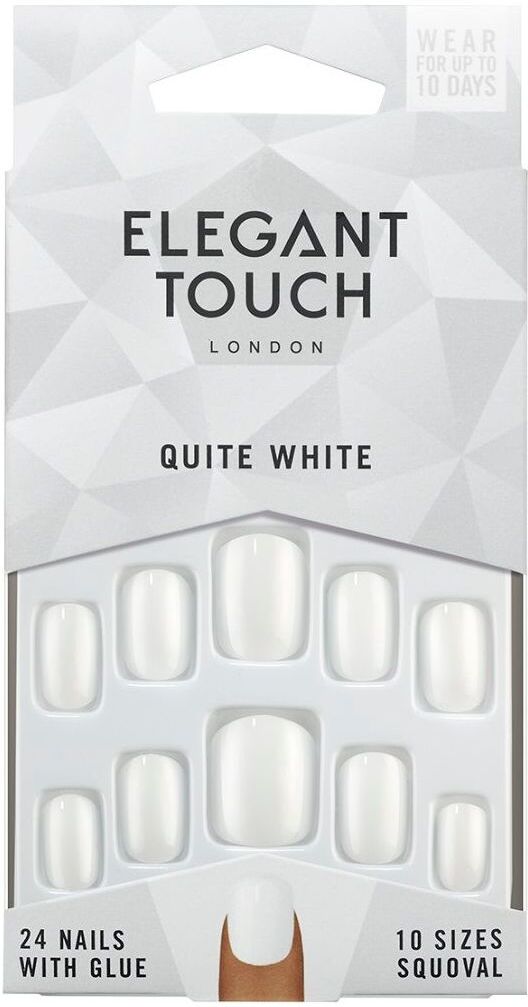
Elegant Touch Remove White False Nails 24 unitsHealth and Beauty Nails Elegant Touch Remove White False Nails 24 units These 'pretty white' nails are so cool with us! In flattened form with a glossy finish, these nails are rightly everything you'll want to wear.4,81 £*Shipping: 3,99 £Secure redirect to the provider
-
Discount Dollar Deals Quickly Remove Fish Scales Kitchen Scraper Tool, Fish Scale Knife, Cooking Accessories Cleaner pinkEffortlessly Remove Fish Scales with This Kitchen Scraper Tool Looking for an efficient way to clean fish Our quickly remove fish scales kitchen scraper tool is designed to save time and effort in the kitchen. With its specialized fish scale knife,...29,97 $*Shipping: 0,00 $Secure redirect to the provider
-
"Lush Decor Natura ""Please Remove Your Shoes"" Outdoor Mat"Our Please Remove Your Shoes mat is vibrant and adorable making it the perfect accent piece for your entryway. This coir utility mat is both stylish and practical. It is made from 100-percent coir which is an all-natural material known for its...32,30 $*Shipping: 0,00 $Secure redirect to the provider
-
How can you remove this PUK menu?
To remove the PUK menu, you will need to enter the correct PUK code provided by your mobile service provider. If you do not have the PUK code, you will need to contact your service provider to obtain it. Once you have the PUK code, enter it into the PUK menu to unlock your SIM card and remove the PUK menu from your device. If you enter the wrong PUK code multiple times, your SIM card may become permanently locked, so it's important to obtain the correct code from your service provider. **
-
How do I remove accessories in The Sims 3?
To remove accessories in The Sims 3, you can do so by entering Create a Sim mode. Once in Create a Sim mode, select the Sim whose accessories you want to remove. Click on the accessory you want to remove, and then click on the "X" button that appears to delete it. Repeat this process for each accessory you want to remove. **
-
How can I remove the smoke smell from Apple accessories?
To remove the smoke smell from Apple accessories, you can try wiping them down with a mixture of water and vinegar or water and baking soda. You can also place the accessories in a sealed container with activated charcoal or coffee grounds to help absorb the odor. Additionally, leaving the accessories outside in fresh air for a few hours can also help to dissipate the smoke smell. **
-
How do I remove the Macrium Reflect boot menu?
To remove the Macrium Reflect boot menu, you can use the "bcdedit" command in the Command Prompt. First, open Command Prompt as an administrator. Then, type "bcdedit /enum firmware" to list all the firmware boot entries. Find the entry for Macrium Reflect and note its identifier. Finally, type "bcdedit /delete {identifier}" to remove the Macrium Reflect boot menu entry. After restarting your computer, the Macrium Reflect boot menu should no longer appear. **
Similar search terms for Remove
-
Uplifted Trends Car Scratch Repair Paste Restore Shine & Remove Scratches For Vehicle Exterior Car Scratch Repair Paste Restore Shine & Remove Scratches For Vehicle ExteriorTired of those unsightly scratches on your vehicle The Car Scratch Repair Paste is your easy solution for quickly restoring your cars exterior to its original shine. Whether it's a minor surface mark or a deeper scratch, this powerful paste gently...39,97 $*Shipping: 0,00 $Secure redirect to the provider
-
JOICO K-Pak Clarifying Shampoo to Remove Chlorine & Build-up 300mlThis gently yet effective K-Pak formula purifies and detoxifies your hair without stripping away precious shine and health. The brilliant Clarifying Shampoo expertly removes impurities derived from chlorine, minerals, pollutants and hard water while moisturising each lock. The result? Smooth, easy-to-comb hair. With SmartRelease Technology, this JOICO hero continuously releases powerhouse ingredients to help repair and strengthen your hair too. Key Benefits • Advanced hair detox • Protects against pollutants Key Ingredients Keratin: this protective protein actively seeks out damage and helps repair every lock by replacing lost proteins. Guajava Fruit Extract: packed with antioxidants and lycopene, this extract protects against free radical and UV damage while allowing for easier styling. Evening Primrose Oil: rich in omega-6 and gamma-linolenic acid, this oil delivers nourishment and balances moisture levels while restoring flexibility, shine and manageability. Ingredients Water/Aqua/Eau, Sodium Laureth Sulfate, Cocamide MEA, Glycol Stearate, Cetyl Alcohol, Cocambopropyl Betaine, Stearic Acid, hydrolyzed Hair Keratin, Laurdimonium Hodroxypropyl Hydrolyzed Hair Keratin, Hydrolyzed Keratin PG-Propyl Methylsilanediol, Thioctic Acid, Butyl Methoxydibenzoylmethane, Psidium Guajava Fruit Extract, Sodium Ascorbyl Phosphate, Tocopheryl Acetate, Oenothera Biennis (Evening Primrose) Oil, Aleurites Moluccana Seed oil, Glycolipids, Hyaluronic Acid, Allantoin, Aloe Barbadensis Leaf Juice, Hydrolyzed Wheat Protein, Dimethicone PEG-7 Cocoate, Hydroxyethycellulose, Acrylates/Aminoacrylates/c10-30 Alkyl PEG-20 Itaconate Copolymer, Pentasodium Pentetate, Benzophenone-4, Glycerin, Hydrolyzed Wheat Starch, Citric Acid, Sodium Chloride, Aminomethyl Propanol, DMDM Hydantoin, Methychloroisothiazolinone, Methylisothiazolinone, Fragrance/Parfum. Gorgeous Shop20,83 £*Shipping: 2,95 £Secure redirect to the provider
-
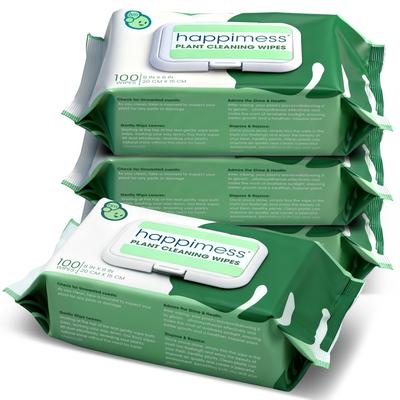
happimess, Essential Oil Plant Cleaning Wipes Remove Dust and Restore Leaf ShineThese plant-care wipes combine natural cleansing power with soothing botanical extracts to keep leaves fresh and glossy. Each soft, durable wipe gently removes dust and residue while nourishing foliage with aloe vera leaf, chamomile, and shea butter.47,99 $*Shipping: 0,00 $Secure redirect to the provider
-
Discount Dollar Deals Quickly Remove Fish Scales Kitchen Scraper Tool, Fish Scale Knife, Cooking Accessories Cleaner greenEffortlessly Remove Fish Scales with This Kitchen Scraper Tool Looking for an efficient way to clean fish Our quickly remove fish scales kitchen scraper tool is designed to save time and effort in the kitchen. With its specialized fish scale knife,...29,97 $*Shipping: 0,00 $Secure redirect to the provider
-
My question is, how can I remove crafting recipes in Minecraft?
To remove crafting recipes in Minecraft, you can use mods or plugins that allow you to customize the game's crafting system. One popular mod for this purpose is CraftTweaker, which lets you modify or remove crafting recipes in the game. Alternatively, you can also use command blocks to disable certain crafting recipes by manipulating the game's code. Keep in mind that using mods or manipulating game code may require some technical knowledge and could potentially affect your game's stability. **
-
How do I remove boot devices from the boot menu?
To remove boot devices from the boot menu, you can access the BIOS or UEFI settings of your computer. Restart your computer and press the designated key (often F2, F10, or Del) to enter the BIOS/UEFI settings. Look for the Boot menu and you should see a list of boot devices. From there, you can select and remove any unwanted boot devices from the list. Save your changes and exit the BIOS/UEFI settings to apply the changes. **
-
What is the key combination to remove the start menu?
To remove the start menu in Windows 10, you can press the Windows key + X on your keyboard. This key combination will open the Power User menu, where you can then select the option to remove the start menu. Alternatively, you can right-click on the start menu button and choose the option to remove it from the context menu. **
-
How can I remove the mod menu from the PS3?
To remove the mod menu from your PS3, you can try the following steps: 1. Uninstall the mod menu by going to the game's data in the system storage and deleting any files related to the mod menu. 2. If the mod menu was installed using a jailbroken PS3, you may need to restore your PS3 to its original firmware to remove the mod menu. 3. You can also try reinstalling the game to see if that removes the mod menu. It's important to note that modifying your PS3 in any way, including installing mod menus, can void your warranty and may violate the terms of service for the console. **
* All prices are inclusive of VAT and, if applicable, plus shipping costs. The offer information is based on the details provided by the respective shop and is updated through automated processes. Real-time updates do not occur, so deviations can occur in individual cases. ** Note: Parts of this content were created by AI.